Text editor · macOS · Windows · Linux
A text editor for very large files.
Logs, data exports, sequencing runs: text files can get big. Crane shows a file as soon as it has read the start, then reads the rest in the background, so you can scroll and search while it does. It’s an everyday editor too, for code, configuration files and notes.
Coming soon · v0.1· macOS, Windows & Linux
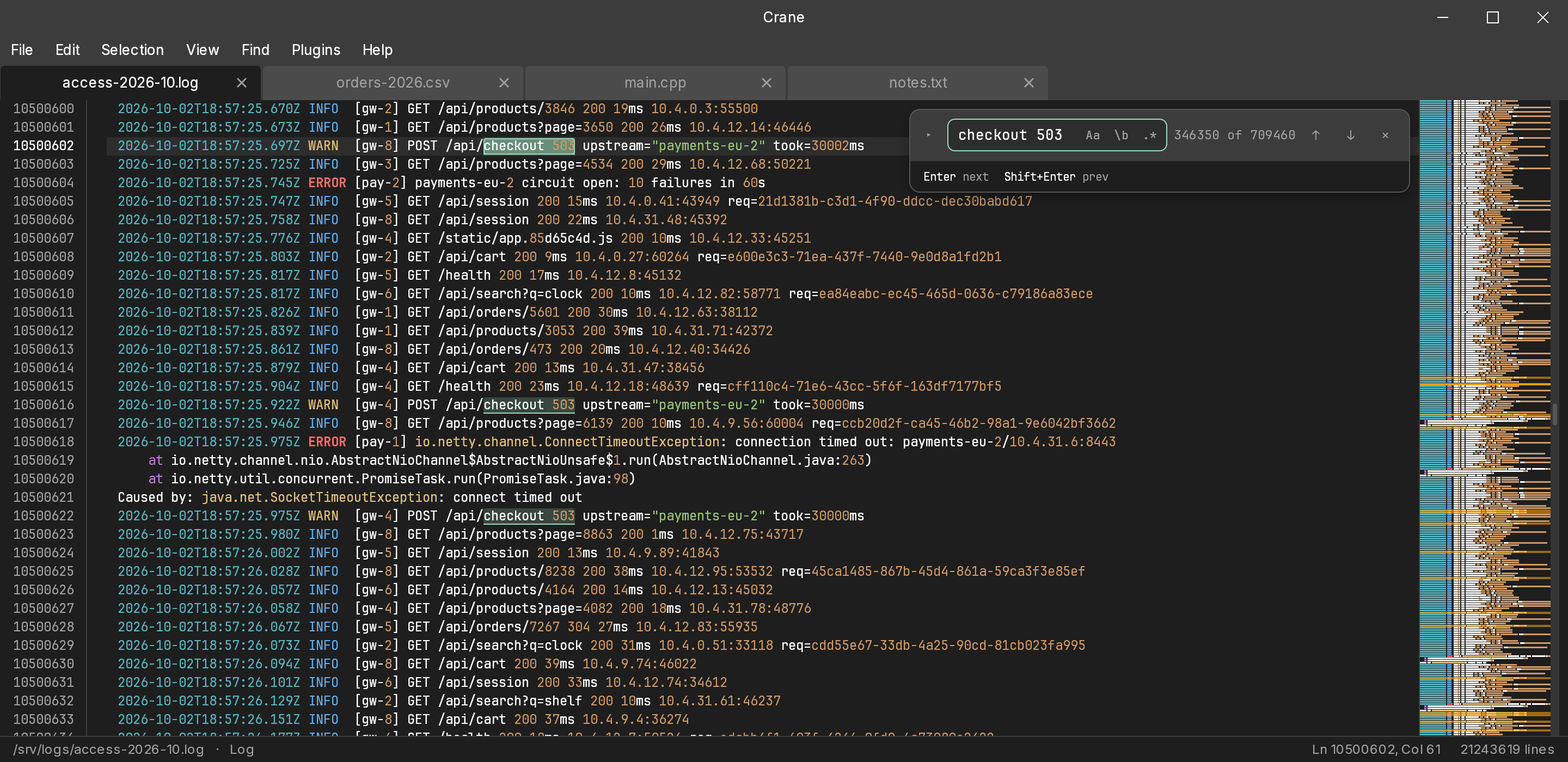
Everyday editing
Not only for big files.
Most files are small, and Crane is a regular text editor for those too — one that also copes when a file turns out to be enormous.
Code
Coloring for Python, JavaScript, TypeScript, C, C++, Ruby, PHP, SQL and shell scripts, with more available as packages. Folding, split views and an optional Vim mode.
Configuration
YAML, TOML, INI, JSON and .properties files, with folding to keep long ones manageable.
Notes and plain text
Lists, drafts, notes and anything else in plain text, with the same editing tools as everything else.
Very large files
Logs, data exports and sequencing data, on screen as soon as the start is read.
See the numbers→
Editing
An editor, not just a viewer.
Many tools can show you a large file. Crane also lets you change it and save it, with the everyday editing tools you’d expect.
Tidy up lines
Sort lines, trim stray spaces, join lines and change case: the clean-ups you’d otherwise do by hand, or by copying everything into another program and back.
Two places at once
Split the window right or down, each part with its own tabs. Open the same file twice to read one part while you edit another.
Collapse what you don’t need
Fold blocks of JSON or code by their brackets or by indentation, or fold everything down to a chosen level, and open them again when you need them.
Find and replace
Plain words or regular expressions, matching case or whole words. Replace All can be undone in one step.
Shortcuts you already know
Standard keys for moving, duplicating and deleting lines, with Ctrl for ⌘ on Windows and Linux. All of them can be changed.
Go to a line
Jump to a line, a line and column, or a byte position that another program reported.
A map of the file
The strip along the side shows where you are in the file, with search matches marked on it.
Asks before reloading
A file that changes on disk reloads by itself, unless you have unsaved edits. Then Crane asks first.
Vim mode
Off by default. Turn it on in Settings if you already use Vim.
Settings in a text file
Easy to read, back up, or copy to another computer.
Light and dark
Follows your system’s appearance setting.
Formats
Made for the files that actually get big.
Logs, spreadsheet exports and sequencing data are where text files tend to reach gigabytes. Crane colors each kind so the parts that matter are easier to spot.
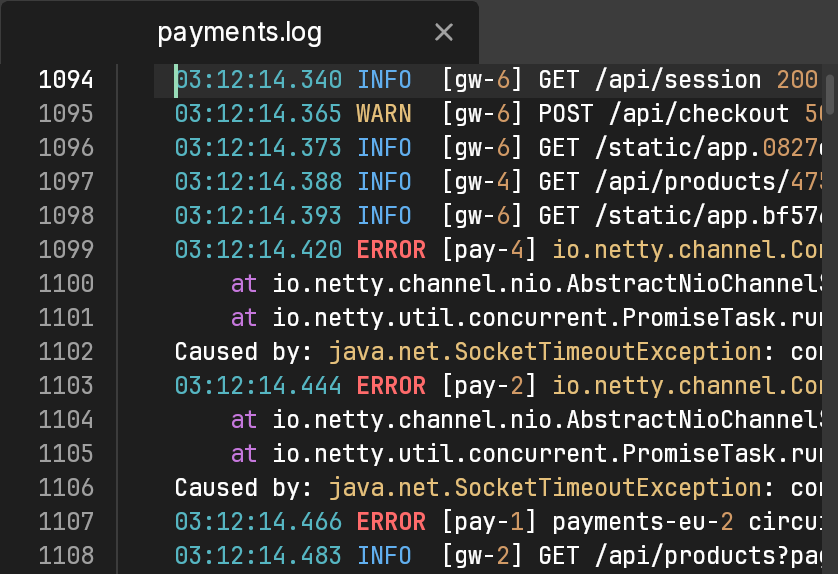
Logs
Times, warnings and errors, web addresses and IP addresses each get their own color, so problems stand out as you scroll — even halfway through a 40 GB file.
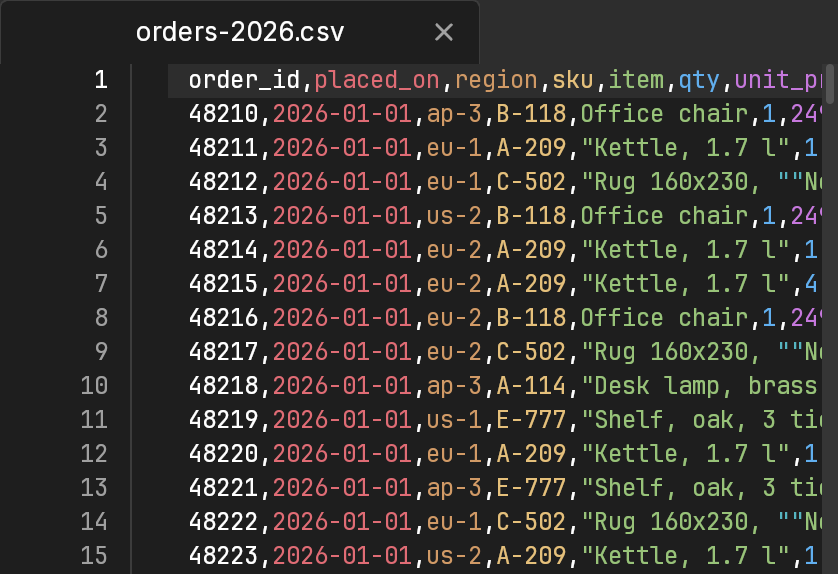
Tables
Each column gets its own color, so you can follow it down a wide file by eye. Quoted fields with commas or line breaks inside are read correctly. TSV too.
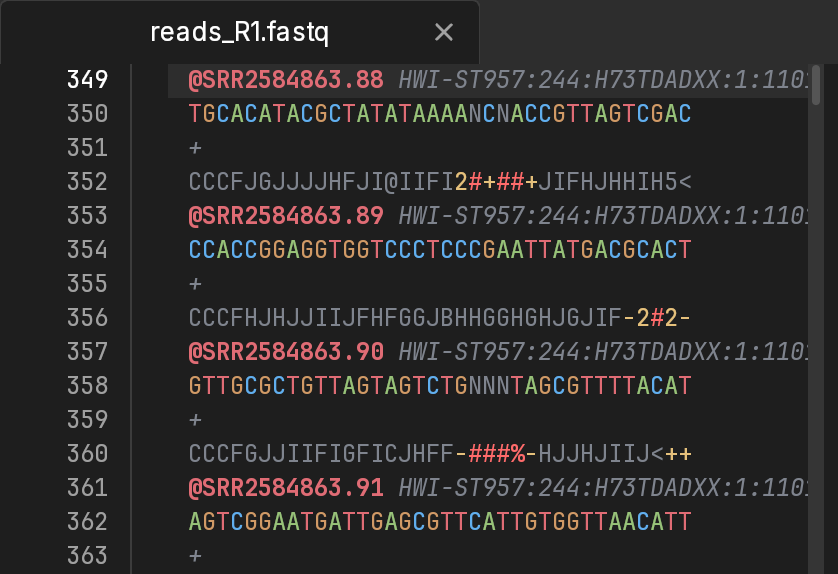
Sequences
Bases in the colors sequence viewers use, and FASTQ quality scores shaded so only the doubtful calls stand out. Protein FASTA too.
Built-in formats, by field
Crane comes with syntax highlighting for all of these. Other formats can be added as packages.
- Software development
- Python, JavaScript, TypeScript, C, C++, Ruby, PHP, SQL, HTML, CSS, JSON, XML
- System administration
- Logs, Bash and other shell scripts, PowerShell, Windows batch files, systemd units, YAML, TOML, INI, .properties
- Data analysis
- CSV, TSV, JSON, SQL dumps, XML, Python
- Bioinformatics
- FASTA, FASTQ, protein FASTA, SAM alignments, Snakemake files, TSV
- Geoscience and surveying
- LAS well logs, XYZ point clouds
- 3D printing and CNC
- G-code, Wavefront OBJ models
Performance
How fast it is.
The middle result of repeated runs of Crane’s own benchmarks on three setups on two computers, with the file already in memory. A file read from disk for the first time is limited by the disk.
All results, the computers, and how they were measured →Searching for a phrase, on all cores.
Higher is better
- Apple M2
- 49.1 GB/smiddle half of runs: 47.7–50.1 GB/s
- AMD Ryzen 7 2700 (Linux)
- 22.2 GB/smiddle half of runs: 21.8–22.4 GB/s
- AMD Ryzen 7 2700 (Windows)
- 23.2 GB/smiddle half of runs: 22.6–24.9 GB/s
Finding line starts while a file opens, on one core.
Higher is better
- Apple M2
- 4.8 GB/s
- AMD Ryzen 7 2700 (Linux)
- 3.9 GB/smiddle half of runs: 3.8–3.9 GB/s
- AMD Ryzen 7 2700 (Windows)
- 3.7 GB/smiddle half of runs: 3.5–3.7 GB/s
Per edit, after 32,000 earlier edits.
Lower is better
- Apple M2
- 2.5 µs
- AMD Ryzen 7 2700 (Linux)
- 3.6 µsmiddle half of runs: 3.5–3.7 µs
- AMD Ryzen 7 2700 (Windows)
- 3.6 µsmiddle half of runs: 3.5–3.9 µs
Who is Crane for?
Anyone who works with text files: code, configuration and notes, and especially large files such as logs, CSV and TSV exports, database dumps and sequencing data. You don't need to be a programmer. It works like any other text editor, and the more technical features stay out of the way until you want them.
How big a file can Crane open?
Crane doesn't need to read the whole file before it shows it, so files larger than your computer's memory open too. It shows the start first and reads the rest in the background while you work.
Can I edit and save a huge file, or only view it?
You can edit and save it. Your changes are kept apart from the original file until you save. Settings → Large files has options for how saving is done.
What happens when a file changes on disk while it's open?
If you haven't changed it, Crane reloads it on its own. If you have unsaved changes, it asks before replacing anything. And if a log is replaced or cut short while it's open, Crane keeps working rather than crashing.
Which platforms does it run on?
macOS, Windows and Linux, as a native app on each: a .dmg for macOS, an .msi installer for Windows, and .deb and .rpm packages for Linux.
Is there a Vim mode?
Yes, off by default and one setting away. It covers the commands most Vim users rely on, including registers, marks, macros and the : command line. Search patterns use Crane's own regular expressions rather than Vim's.
Is Crane finished?
No. It's an early beta, so expect rough edges. Some things aren't there yet, including Find in Files, multiple cursors, a command palette and plugins. The feedback page is the best way to say what you'd like to see.
I found a bug, or I need something that isn't here.
Please use the feedback page. That's where bug reports and requests are collected, and they help decide what gets worked on next.

Try it on your own files.
The first public builds for macOS, Windows and Linux aren’t published yet. Check back soon, or tell us what you’d like Crane to do.